
The bullet block is a block where you can place an avatar image and a name on one side, and insert any block you want into the bullet block on the other side. It is used in situations where you want to add rhythm to the text, such as "Conversations with the Creator" and "Q&A." The design is tailored to the tone of shitate the blog, and there are no decorations other than the bullet block itself.
Actual display
Since this manual is located on the site that is currently shitate pro blocks running, the following isReal blocks, not imagesHowever, please actually click on it, open it, and check the movement to confirm its functionality.
 Creator
You can include a design that looks like a conversation using icons and speech bubbles like this!
CreatorYou are free to invert the icons or change their colors as well!
However, we do not provide designs other than speech bubbles; we will consider it if there are many requests!
Basic usage
- From "shitate unique blocks" in the block insertion toolSpeech BubbleAdd the
- Click the round placeholder on the left (the "Settings") or select the avatar image from the "Set Icon" toolbar.
- Enter a display name under the avatar's "Name". If left blank, the name will not be output.
- Write the text inside the bulleted list. You can insert any block, such as images, lists, and buttons, in addition to paragraphs.
- To make it look like a conversation, in the second prompt, change the avatar's position to "right."
Settings screen in the editor
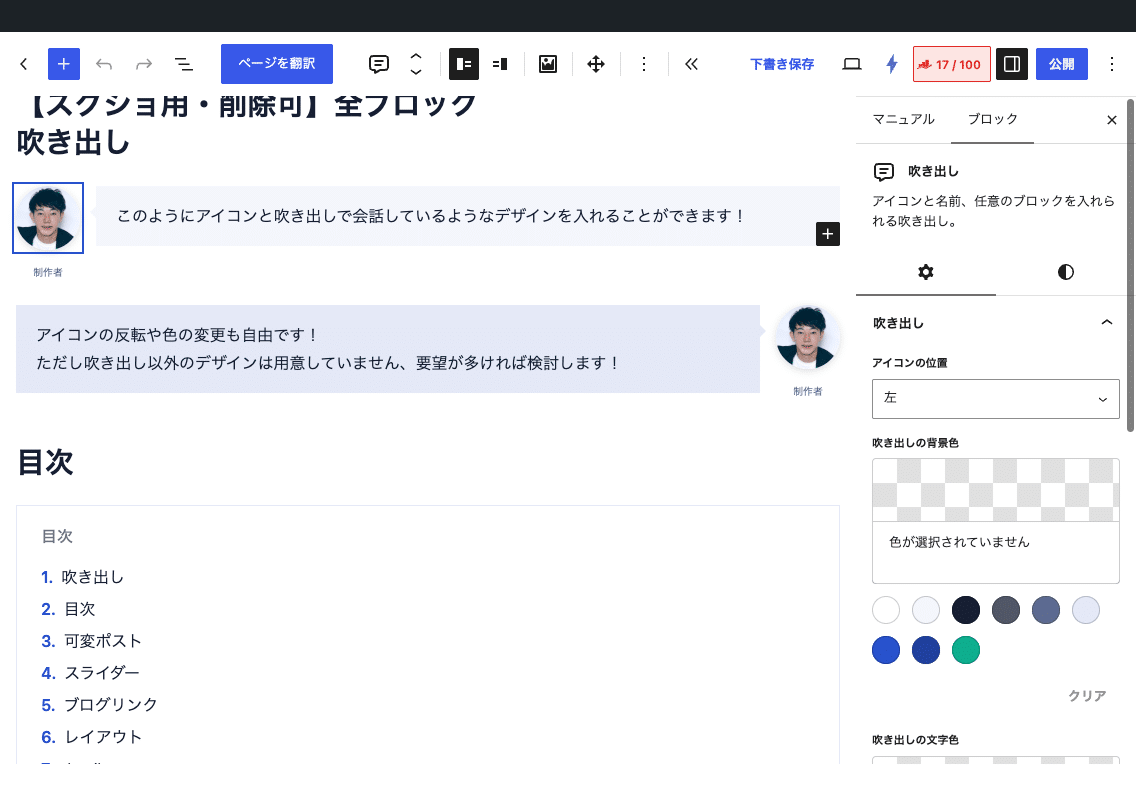
Settings
- The position of the icon(Toolbar/Sidebar) — Left (default) or right. When you move it to the right, the spout’s tail also moves to the right.
- Avatar image(Toolbar/Sidebar) — Settings, changes, and removal. It appears as a 64px circle. Since it is decorative, the alt text is empty.
- Name(Above the caption) — shitate Buttons on the text toolbar (Marker Span, Line Feed, and Tabulator)
) You can use bold and italic fonts. You cannot use bold and italic fonts. - speech bubble background color(Sidebar) — Select from the color palette. CSS Variables
--sb-bubble-bgIt enters into it and follows the color of the tail as well. - Balloon text color(Sidebar) — Also a color palette. CSS variable
--sb-bubble-colorIt goes into the - As a common setting for blocks, you can use the top margin and HTML anchors.
Customizing with CSS
The structure of the HTML output is as follows: The block body .sb-speech-bubbleThe parts are class-starting with a hyphen (-avatar -name -body)、the situation is is-position-left / is-the-position-correct It is.
<div class="sb-speech-bubble is-position-left">
  <div class="-avatar"><img alt=""><span class="-name">Name</span></div>
  <div class="-body" style="--sb-bubble-bg:…;--sb-bubble-color:…">…The contents…</div>
</div>
If you want to change the colors and rounded corners across the entire site, it's definitely safer to override the CSS variables in the theme instead of setting them per block.
/* 吹き出しの色をサイト全体で統一する */
.sb-speech-bubble > .-body {
	--sb-bubble-bg: #fff7e6;
	--sb-bubble-color: #3a2a00;
}

/* 角丸を付ける(他のカード類と共通の変数) */
:root {
	--sb-radius: 0.75rem;
}--sb-bubble-bg— The bullet and tail background colors. Default value isvar(--st-color-base-2, #f4f6fc)--sb-bubble-color— The font color of the bullet text. The default value isinherit--sb-radius— Rounded corners of the bullet point. The default value is0(Common to cards, buttons, and table of contents, etc.)
The style of the parts @scope (.sb-speech-bubble) to (.-body > *) Since it is written within the block, the decorative elements of the bullet will not leak into the other blocks (for example, the table of contents or cards placed inside). Even when writing your own CSS,.sb-speech-bubble > .-body Please specify as a group with your parent.
Points to note
- The width of the avatar is fixed at 64px. It cannot be changed in a variable, so if you want to change it, you need to do it in the code.
.sb-speech-bubble > .-avatar imgPlease apply CSS to it. - The avatar image will be output in the original size URL when selected. It will be lighter if you prepare a smaller image (about 200px square).
- 1.6.1 Outlines saved before (old class
sb-speechWhen opened in the editor, it will automatically convert to the new format. The custom CSS I wrote for the old class.sb-speech-bubblePlease replace it with "to."