
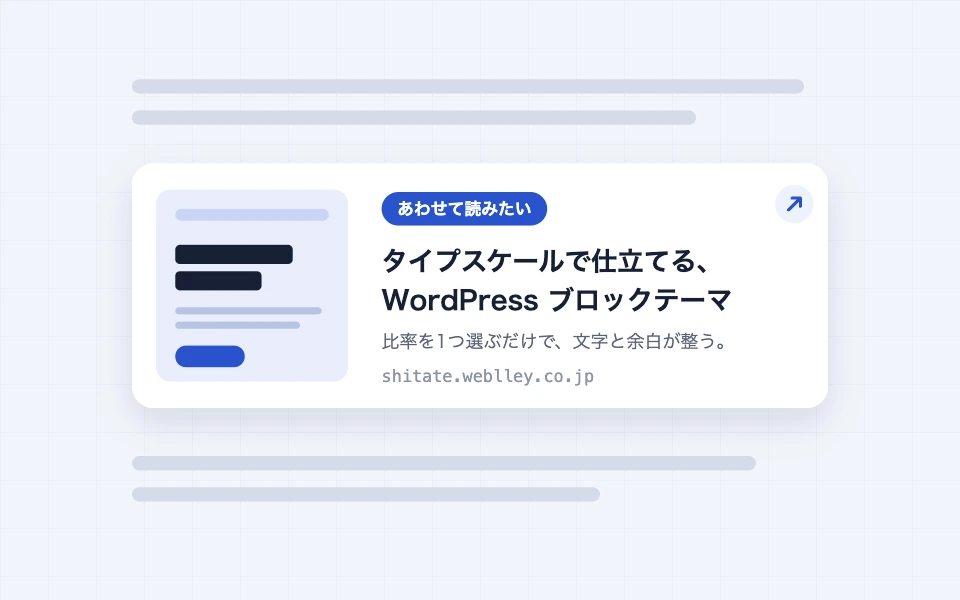
The blog link is a block that takes the title, description, and image (OGP) of the linked page by simply entering the URL. It can also be used for internal links like "Read more" or "Related articles," and for introducing external sites. Since the pages within your own site use the post data directly, there is no communication involved.
Actual display
Since this manual is located on the site that is currently shitate pro blocks running, the following isReal blocks, not imagesHowever, please actually click on it, open it, and check the movement to confirm its functionality.
Related reading shitate pro blocks shitateOf course, by adding it to your current WordPress theme, you’ll have access to 14 new blocks… shitate
 Examples of external sites
A CMS that can be used to build everything from a blog to a large-scale site – WordPress.org

Basic usage
- From "shitate unique blocks"Blog LinkAdd the
- Paste the URL into the input field that appears and press "Create Card" (the same goes for the URL field in the sidebar; pressing Enter or leaving the input field will confirm).
- A preview of the card appears on the editor. If necessary, adjust the labels and display items in the sidebar.
Settings screen in the editor
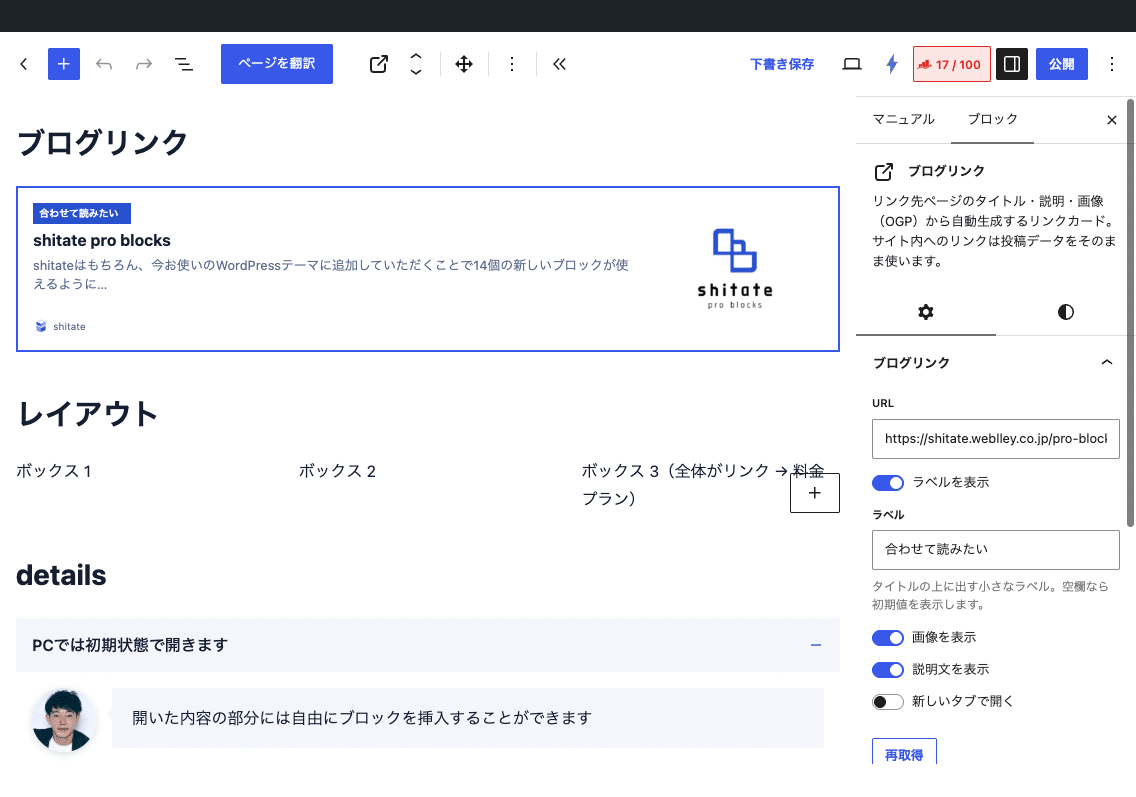
Settings items (sidebar)
- URL — Link destination. Only http/https.
- Show the label(Initial value on) andLabel — The small badge above the title. If the field is empty, the initial value "Read together" will be displayed.
- View the image/Display the description(Both are set to the initial value)
- Open in a new tab(Initial value off)
- Re-acquiredButton — Discard the cache and refresh the link destination. Use immediately after changing the title and image of the destination link.
What to acquire
- The URL of the site — Use the post title, excerpt (if applicable, 60 words from the body), the icon (medium size), and the site name and site icon directly in the post. Only published posts are eligible; drafts and unlisted posts are treated the same as external sites.
- URL of external site — on the page
<head>Fromog:title(If not</code>)、<code>og:description</code>(If not <code>description</code>)、<code>og:image</code>、<code>og:site_name</code>(If not host name), read the favicon. Retrieving takes 6 seconds and up to 600KB, and the character encoding is automatically converted.</li> <li>If it cannot be obtained, it is a card that includes the URL in the title and the host name in the site name. The link itself will not be broken.</li> </ul> <h2 id="sb-toc-b5635f30" class="wp-block-heading">How cash works</h2> <p class="wp-block-paragraph">The retrieved content is cached for 30 days. If it becomes older than 1 week, the display remains cached and is refreshed in the background (stale-while-revalidate). Therefore, the page display does not wait for external site response. URLs that fail to retrieve are recorded as “failed” for only 1 hour, during which time they become fallback cards.</p> <p class="wp-block-paragraph">The period of time considered "old" and the initial value of the label can be changed with the filter.</p> <div class="hcb_wrap"><pre class="prism line-numbers lang-php" data-lang="PHP" data-show-lang="1"><code>add_filter( 'sb_blog_link_fresh_ttl', fn() => DAY_IN_SECONDS ); // Default value is WEEK_IN_SECONDS add_filter( 'sb_blog_link_default_label', fn() => 'Related Articles' ); // Default value for the label</code></pre></div> <h2 id="sb-toc-7af726eb" class="wp-block-heading">HTML and CSS output</h2> <p class="wp-block-paragraph">The entire card is one <code><a class="sb-blog-link"></code> However, all images are treated as decorative elements (alt empty). Therefore, screen readers read them as links connecting the label, title, description, and site name. JavaScript is not used.</p> <div class="hcb_wrap"><pre class="prism line-numbers lang-html" data-lang="HTML" data-show-lang="1"><code><a class="sb-blog-link has-thumb" href="/en/…/"> <span class="-text"> <span class="-label">Would like to read them together</span> <span class="-title">…</span> <span class="-desc">…</span> <span class="-site"><img alt="">Site name</span> </span> <span class="-thumb"><img alt=""></span> </a></code></pre></div> <p class="wp-block-paragraph">Thumbnail width <code>clamp (6rem, 28%, 11rem)</code>• Ratio 4:3; the title and description are omitted in two lines. Media queries are not used. The brackets are <code>--sb-radius</code>(Card) and <code>--sb-radius-s</code>In (Label, Thumbnail, Favicon), the background of the label and the border when hovered are <code>--st-color-brand</code> It is.</p> <div class="hcb_wrap"><pre class="prism line-numbers lang-css" data-lang="CSS" data-show-lang="1"><code>/* サムネイルを正方形に、ラベルの色を変える */ .sb-blog-link > .-thumb { aspect-ratio: 1 / 1; } .sb-blog-link > .-text > .-label { background: #c80000; }</code></pre></div> <h2 id="sb-toc-6face192" class="wp-block-heading">Points to note</h2> <ul class="wp-block-list"> <li>The data from the site's posts also get stored in the same cache. Even if you edit the post, it won't be reflected in the card until it has been refreshed after a week or you press "Re-retrieve."</li> <li>URLs without cached data are retrieved on the fly at the time of the front-end’s initial display (up to 6 seconds). Since caching is usually enabled when previewed in the editor, there is almost no waiting after publishing.</li> <li>Sites that are not correctly displaying OGP or sites that deny bot access will only display a card with the URL.</li> <li>It is the successor to the link-area block that was discontinued in 1.0.0. Saved link-areas will become "unknown blocks", so please replace them with blog links or box elements in the layout.</li> </ul> </div> <div style="height:var(--wp--preset--spacing--50)" aria-hidden="true" class="wp-block-spacer"></div> </main> <footer class="wp-block-template-part"> <footer class="wp-block-group has-base-color has-contrast-background-color has-text-color has-background has-global-padding is-layout-constrained wp-block-group-is-layout-constrained" style="padding-top:var(--wp--preset--spacing--60);padding-bottom:var(--wp--preset--spacing--40)"> <div class="wp-block-group is-content-justification-space-between is-layout-flex wp-container-core-group-is-layout-997d4124 wp-block-group-is-layout-flex"> <div class="wp-block-group is-vertical is-layout-flex wp-container-core-group-is-layout-f4c29d22 wp-block-group-is-layout-flex"><div class="wp-block-site-logo"><a href="https://shitate.weblley.co.jp/en/" class="custom-logo-link" rel="home"><img width="222" height="61" src="https://shitate.weblley.co.jp/wp-content/uploads/2026/09/logo.svg" class="custom-logo" alt="shitate" decoding="async" /></a></div></div> <nav class="items-justified-left is-vertical wp-block-navigation is-content-justification-left is-layout-flex wp-container-core-navigation-is-layout-d68254e7 wp-block-navigation-is-layout-flex"></nav><div class="wp-search-banner" style="text-align:center;margin-top:var(--st-space-m,1.5rem);"><a href="https://wp-search.org/ja/" rel="noopener" target="_blank"><img decoding="async" loading="lazy" width="234" height="60" alt="WP-Search | A tool for researching WordPress themes, plugins and servers, plus a design showcase" src="https://cdn.wp-search.org/wp-content/uploads/banner-image-wp-search-ja.png" style="max-width:100%;height:auto;display:inline-block;"></a></div></div> <div style="height:var(--wp--preset--spacing--40)" aria-hidden="true" class="wp-block-spacer"></div> <p class="footer-sites has-base-color has-text-color has-link-color has-x-small-font-size wp-elements-1 wp-block-paragraph">Website:<a href="https://senshu-sumai.com/" target="_blank" rel="noreferrer noopener">Ziwu Shumi.com</a> / <a href="https://ac.mynenpyo.com/" target="_blank" rel="noreferrer noopener">My timeline</a> / <a href="https://jazz-session-portal.com/" target="_blank" rel="noreferrer noopener">JAZZ SESSION PORTAL</a></p> <p class="has-text-align-left has-base-color has-text-color has-small-font-size wp-block-paragraph">© 2026 shitate. All rights reserved.</p> </footer> </footer> </div> <template id="tp-language" data-tp-language="en_US"></template><script type="speculationrules"> {"prefetch":[{"source":"document","where":{"and":[{"href_matches":"/en/*"},{"not":{"href_matches":["/wp-*.php","/wp-admin/*","/wp-content/uploads/*","/wp-content/*","/wp-content/plugins/*","/wp-content/themes/shitate/*","/en/*\\?(.+)"]}},{"not":{"selector_matches":"a[rel~=\"nofollow\"]"}},{"not":{"selector_matches":".no-prefetch, .no-prefetch a"}}]},"eagerness":"conservative"}]} </script> <script data-wp-router-options="{"loadOnClientNavigation":true}" fetchpriority="low" id="@wordpress/block-library/navigation/view-js-module" src="https://shitate.weblley.co.jp/wp-includes/js/dist/script-modules/block-library/navigation/view.min.js?ver=1bf28ded04f9f188bdcb" type="module"></script> <script id="trp-dynamic-translator-js-extra"> var trp_data = {"trp_custom_ajax_url":"https://shitate.weblley.co.jp/wp-content/plugins/translatepress-multilingual/includes/trp-ajax.php","trp_wp_ajax_url":"https://shitate.weblley.co.jp/wp-admin/admin-ajax.php","trp_language_to_query":"en_US","trp_original_language":"ja","trp_current_language":"en_US","trp_skip_selectors":["[data-no-translation]","[data-no-dynamic-translation]","[data-trp-translate-id-innertext]","script","style","head","trp-span","translate-press","[data-trp-translate-id]","[data-trpgettextoriginal]","[data-trp-post-slug]"],"trp_base_selectors":["data-trp-translate-id","data-trpgettextoriginal","data-trp-post-slug"],"trp_attributes_selectors":{"text":{"accessor":"outertext","attribute":false},"block":{"accessor":"innertext","attribute":false},"image_src":{"selector":"img[src]","accessor":"src","attribute":true},"submit":{"selector":"input[type='submit'],input[type='button'], input[type='reset']","accessor":"value","attribute":true},"placeholder":{"selector":"input[placeholder],textarea[placeholder]","accessor":"placeholder","attribute":true},"title":{"selector":"[title]","accessor":"title","attribute":true},"a_href":{"selector":"a[href]","accessor":"href","attribute":true},"button":{"accessor":"outertext","attribute":false},"option":{"accessor":"innertext","attribute":false},"aria_label":{"selector":"[aria-label]","accessor":"aria-label","attribute":true},"video_src":{"selector":"video[src]","accessor":"src","attribute":true},"video_poster":{"selector":"video[poster]","accessor":"poster","attribute":true},"video_source_src":{"selector":"video source[src]","accessor":"src","attribute":true},"audio_src":{"selector":"audio[src]","accessor":"src","attribute":true},"audio_source_src":{"selector":"audio source[src]","accessor":"src","attribute":true},"picture_image_src":{"selector":"picture image[src]","accessor":"src","attribute":true},"picture_source_srcset":{"selector":"picture source[srcset]","accessor":"srcset","attribute":true},"image_alt":{"selector":"img[alt]","accessor":"alt","attribute":true},"meta_desc":{"selector":"meta[name=\"description\"],meta[property=\"og:title\"],meta[property=\"og:description\"],meta[property=\"og:site_name\"],meta[property=\"og:image:alt\"],meta[name=\"twitter:title\"],meta[name=\"twitter:description\"],meta[name=\"twitter:image:alt\"],meta[name=\"DC.Title\"],meta[name=\"DC.Description\"],meta[property=\"article:section\"],meta[property=\"article:tag\"]","accessor":"content","attribute":true},"page_title":{"selector":"title","accessor":"innertext","attribute":false},"meta_desc_img":{"selector":"meta[property=\"og:image\"],meta[property=\"og:image:secure_url\"],meta[name=\"twitter:image\"]","accessor":"content","attribute":true}},"trp_attributes_accessors":["outertext","innertext","src","value","placeholder","title","href","aria-label","poster","srcset","alt","content"],"gettranslationsnonceregular":"0ec38e4f7a","showdynamiccontentbeforetranslation":"","skip_strings_from_dynamic_translation":[],"skip_strings_from_dynamic_translation_for_substrings":{"href":["amazon-adsystem","googleads","g.doubleclick"]},"duplicate_detections_allowed":"100","trp_translate_numerals_opt":"no","trp_no_auto_translation_selectors":["[data-no-auto-translation]"]}; //# sourceURL=trp-dynamic-translator-js-extra </script> <script id="trp-dynamic-translator-js" src="https://shitate.weblley.co.jp/wp-content/plugins/translatepress-multilingual/assets/js/trp-translate-dom-changes.js?ver=3.3.8"></script> <script data-wp-strategy="defer" defer id="shitate-navigation-toggle-js" src="https://shitate.weblley.co.jp/wp-content/themes/shitate/assets/js/navigation-toggle.js?ver=1.0.7"></script> <script id="hcb-prism-js" src="https://shitate.weblley.co.jp/wp-content/plugins/highlighting-code-block/assets/js/prism.js?ver=2.2.1"></script> <script id="clipboard-js" src="https://shitate.weblley.co.jp/wp-includes/js/clipboard.min.js?ver=2.0.11"></script> <script id="hcb-script-js-extra"> var hcbVars = {"showCopyBtn":"1","copyBtnLabel":"Copy code to clipboard"}; //# sourceURL=hcb-script-js-extra </script> <script id="hcb-script-js" src="https://shitate.weblley.co.jp/wp-content/plugins/highlighting-code-block/build/js/hcb_script.js?ver=2.2.1"></script> <script id="wp-emoji-settings" type="application/json"> {"baseUrl":"https://s.w.org/images/core/emoji/17.0.2/72x72/","ext":".png","svgUrl":"https://s.w.org/images/core/emoji/17.0.2/svg/","svgExt":".svg","source":{"concatemoji":"https://shitate.weblley.co.jp/wp-includes/js/wp-emoji-release.min.js?ver=7.1.4"}} </script> <script type="module"> /*! This file is auto-generated */ var e="script#wp-emoji-settings",t=document.querySelector(e);if(!(t instanceof HTMLScriptElement))throw new Error("Element missing: "+e);const r=JSON.parse(t.text),s=(window._wpemojiSettings=r,"wpEmojiSettingsSupports"),o=["flag","emoji"];function i(e){try{var t={supportTests:e,timestamp:(new Date).valueOf()};sessionStorage.setItem(s,JSON.stringify(t))}catch(e){}}function c(e,t,n){e.clearRect(0,0,e.canvas.width,e.canvas.height),e.fillText(t,0,0);t=new Uint32Array(e.getImageData(0,0,e.canvas.width,e.canvas.height).data);e.clearRect(0,0,e.canvas.width,e.canvas.height),e.fillText(n,0,0);const r=new Uint32Array(e.getImageData(0,0,e.canvas.width,e.canvas.height).data);return t.every((e,t)=>e===r[t])}function p(e,t){e.clearRect(0,0,e.canvas.width,e.canvas.height),e.fillText(t,0,0);var n=e.getImageData(16,16,1,1);for(let e=0;e<n.data.length;e++)if(0!==n.data[e])return!1;return!0}function u(e,t,n,r){switch(t){case"flag":return n(e,"\ud83c\udff3\ufe0f\u200d\u26a7\ufe0f","\ud83c\udff3\ufe0f\u200b\u26a7\ufe0f")?!1:!n(e,"\ud83c\udde8\ud83c\uddf6","\ud83c\udde8\u200b\ud83c\uddf6")&&!n(e,"\ud83c\udff4\udb40\udc67\udb40\udc62\udb40\udc65\udb40\udc6e\udb40\udc67\udb40\udc7f","\ud83c\udff4\u200b\udb40\udc67\u200b\udb40\udc62\u200b\udb40\udc65\u200b\udb40\udc6e\u200b\udb40\udc67\u200b\udb40\udc7f");case"emoji":return!r(e,"\ud83e\u1fac8")}return!1}function f(e,t,n,r){let a;const s=(a="undefined"!=typeof WorkerGlobalScope&&self instanceof WorkerGlobalScope?new OffscreenCanvas(300,150):document.createElement("canvas")).getContext("2d",{willReadFrequently:!0}),o=(s.textBaseline="top",s.font="600 32px Arial",{});return e.forEach(e=>{o[e]=t(s,e,n,r)}),o}function a(e){var t=document.createElement("script");t.src=e,t.defer=!0,document.head.appendChild(t)}r.supports={everything:!0,everythingExceptFlag:!0},new Promise(t=>{let n=function(){try{var e=JSON.parse(sessionStorage.getItem(s));if("object"==typeof e&&"number"==typeof e.timestamp&&(new Date).valueOf()<e.timestamp+604800&&"object"==typeof e.supportTests)return e.supportTests}catch(e){}return null}();if(!n){if("undefined"!=typeof Worker&&"undefined"!=typeof OffscreenCanvas&&"undefined"!=typeof URL&&URL.createObjectURL&&"undefined"!=typeof Blob)try{var e="postMessage("+f.toString()+"("+[JSON.stringify(o),u.toString(),c.toString(),p.toString()].join(",")+"));",r=new Blob([e],{type:"text/javascript"});const a=new Worker(URL.createObjectURL(r),{name:"wpTestEmojiSupports"});return void(a.onmessage=e=>{i(n=e.data),a.terminate(),t(n)})}catch(e){}i(n=f(o,u,c,p))}t(n)}).then(e=>{for(const n in e)r.supports[n]=e[n],r.supports.everything=r.supports.everything&&r.supports[n],"flag"!==n&&(r.supports.everythingExceptFlag=r.supports.everythingExceptFlag&&r.supports[n]);var t;r.supports.everythingExceptFlag=r.supports.everythingExceptFlag&&!r.supports.flag,r.supports.everything||((t=r.source||{}).concatemoji?a(t.concatemoji):t.wpemoji&&t.twemoji&&(a(t.twemoji),a(t.wpemoji)))}); //# sourceURL=https://shitate.weblley.co.jp/wp-includes/js/wp-emoji-loader.min.js </script> <button type="button" class="sds-fab" data-sds-open aria-haspopup="dialog" aria-controls="sds-dialog" aria-label="Try the type scale" title="Try the type scale" data-no-translation-aria-label="" data-no-translation-title=""> <span class="sds-fab__glyph" aria-hidden="true">Aa</span> </button> <dialog id="sds-dialog" class="sds-dialog" aria-labelledby="sds-dialog-title"> <div class="sds-dialog__inner"> <header class="sds-dialog__header"> <h2 id="sds-dialog-title" class="sds-dialog__title" data-no-translation="" data-trp-gettext="">Typography Scale</h2> <button type="button" class="sds-dialog__close" data-sds-close aria-label="Close" data-no-translation-aria-label="">×</button> </header> <p class="sds-dialog__lead" data-no-translation="" data-trp-gettext="">Changes apply to this page instantly and are remembered in your browser only. Nothing is saved on the site.</p> <div class="sds-field"> <label class="sds-field__label" for="sds-ratio" data-no-translation="" data-trp-gettext="">Scale ratio</label> <select id="sds-ratio" class="sds-field__select" data-sds-ratio> <option value="1.067" data-no-translation="" data-trp-gettext="">Minor Second — 1.067</option> <option value="1.125" data-no-translation="" data-trp-gettext="">Major Second — 1.125</option> <option value="1.2" data-no-translation="" data-trp-gettext="">Minor Third — 1.2</option> <option value="1.25" data-no-translation="" data-trp-gettext="">Major Third — 1.25</option> <option value="1.333" selected='selected' data-no-translation="" data-trp-gettext="">Perfect Fourth — 1.333</option> <option value="1.414" data-no-translation="" data-trp-gettext="">Augmented Fourth — 1.414</option> <option value="1.5" data-no-translation="" data-trp-gettext="">Perfect Fifth — 1.5</option> <option value="1.618" data-no-translation="" data-trp-gettext="">Golden Ratio — 1.618</option> </select> <p class="sds-field__help" data-no-translation="" data-trp-gettext="">Bigger ratio = more contrast between headings (like typescale.com).</p> </div> <div class="sds-field"> <label class="sds-field__label" for="sds-ratio-mobile" data-no-translation="" data-trp-gettext="">Scale ratio on small screens</label> <select id="sds-ratio-mobile" class="sds-field__select" data-sds-ratio-mobile> <option value="auto" data-no-translation="" data-trp-gettext="">Auto — halfway between 1 and the main ratio</option> <option value="1.067" data-no-translation="" data-trp-gettext="">Minor Second — 1.067</option> <option value="1.125" data-no-translation="" data-trp-gettext="">Major Second — 1.125</option> <option value="1.2" data-no-translation="" data-trp-gettext="">Minor Third — 1.2</option> <option value="1.25" selected='selected' data-no-translation="" data-trp-gettext="">Major Third — 1.25</option> <option value="1.333" data-no-translation="" data-trp-gettext="">Perfect Fourth — 1.333</option> <option value="1.414" data-no-translation="" data-trp-gettext="">Augmented Fourth — 1.414</option> <option value="1.5" data-no-translation="" data-trp-gettext="">Perfect Fifth — 1.5</option> <option value="1.618" data-no-translation="" data-trp-gettext="">Golden Ratio — 1.618</option> </select> <p class="sds-field__help" data-no-translation="" data-trp-gettext="">The ratio used at 375px wide. The scale eases from this to the main ratio by 1260px, so type and spacing tighten on phones without media queries.</p> </div> <div class="sds-field"> <label class="sds-field__label" for="sds-base"> Base size <output class="sds-field__value" data-sds-base-out for="sds-base">16px</output> </label> <input id="sds-base" class="sds-field__range" type="range" min="12" max="24" step="1" value="16" data-sds-base> <p class="sds-field__help" data-no-translation="" data-trp-gettext="">Body text size. The whole scale is built from this.</p> </div> <div class="sds-field"> <label class="sds-switch"> <input type="checkbox" data-sds-round> <span class="sds-switch__track" aria-hidden="true"></span> <span class="sds-switch__text" data-no-translation="" data-trp-gettext="">Apply rounding to font sizes</span> </label> <p class="sds-field__help" data-no-translation="" data-trp-gettext="">Snaps every text step to even pixels (2px).</p> </div> <div class="sds-field"> <label class="sds-switch"> <input type="checkbox" data-sds-fixed-small checked='checked'> <span class="sds-switch__track" aria-hidden="true"></span> <span class="sds-switch__text" data-no-translation="" data-trp-gettext="">Fixed sizes for small text</span> </label> <p class="sds-field__help" data-no-translation="" data-trp-gettext="">Sets Small / X-Small / XX-Small to 0.95rem / 0.8rem / 0.75rem instead of dividing by the ratio, which can make them too small to read.</p> </div> <table class="sds-steps" aria-live="polite"> <caption class="sds-steps__caption" data-no-translation="" data-trp-gettext="">Resulting sizes at this viewport</caption> <tbody> <tr class="sds-steps__row"> <th scope="row" class="sds-steps__name" data-no-translation="" data-trp-gettext="">Display / H1</th> <td class="sds-steps__sample"><span class="sds-steps__aa" data-sds-sample="xxxl" aria-hidden="true">Aa</span></td> <td class="sds-steps__px"><output data-sds-step="xxxl">–</output></td> </tr> <tr class="sds-steps__row"> <th scope="row" class="sds-steps__name" data-no-translation="" data-trp-gettext="">Huge / H2</th> <td class="sds-steps__sample"><span class="sds-steps__aa" data-sds-sample="xxl" aria-hidden="true">Aa</span></td> <td class="sds-steps__px"><output data-sds-step="xxl">–</output></td> </tr> <tr class="sds-steps__row"> <th scope="row" class="sds-steps__name" data-no-translation="" data-trp-gettext="">Extra Large / H3</th> <td class="sds-steps__sample"><span class="sds-steps__aa" data-sds-sample="xl" aria-hidden="true">Aa</span></td> <td class="sds-steps__px"><output data-sds-step="xl">–</output></td> </tr> <tr class="sds-steps__row"> <th scope="row" class="sds-steps__name" data-no-translation="" data-trp-gettext="">Large / H4</th> <td class="sds-steps__sample"><span class="sds-steps__aa" data-sds-sample="l" aria-hidden="true">Aa</span></td> <td class="sds-steps__px"><output data-sds-step="l">–</output></td> </tr> <tr class="sds-steps__row"> <th scope="row" class="sds-steps__name" data-no-translation="" data-trp-gettext="">Medium / Body</th> <td class="sds-steps__sample"><span class="sds-steps__aa" data-sds-sample="m" aria-hidden="true">Aa</span></td> <td class="sds-steps__px"><output data-sds-step="m">–</output></td> </tr> <tr class="sds-steps__row"> <th scope="row" class="sds-steps__name" data-no-translation="" data-trp-gettext="">Small / H6</th> <td class="sds-steps__sample"><span class="sds-steps__aa" data-sds-sample="s" aria-hidden="true">Aa</span></td> <td class="sds-steps__px"><output data-sds-step="s">–</output></td> </tr> <tr class="sds-steps__row"> <th scope="row" class="sds-steps__name" data-no-translation="" data-trp-gettext="">X-Small</th> <td class="sds-steps__sample"><span class="sds-steps__aa" data-sds-sample="xs" aria-hidden="true">Aa</span></td> <td class="sds-steps__px"><output data-sds-step="xs">–</output></td> </tr> <tr class="sds-steps__row"> <th scope="row" class="sds-steps__name" data-no-translation="" data-trp-gettext="">XX-Small</th> <td class="sds-steps__sample"><span class="sds-steps__aa" data-sds-sample="xxs" aria-hidden="true">Aa</span></td> <td class="sds-steps__px"><output data-sds-step="xxs">–</output></td> </tr> </tbody> </table> <footer class="sds-dialog__footer"> <button type="button" class="sds-btn sds-btn--ghost" data-sds-reset data-no-translation="" data-trp-gettext="">Reset to theme settings</button> <button type="button" class="sds-btn" data-sds-close data-no-translation="" data-trp-gettext="">Done</button> </footer> </div> </dialog> <nav class="trp-language-switcher trp-floating-switcher trp-ls-dropdown trp-switcher-position-bottom" style="--bg:#ffffff;--bg-hover:#0000000d;--text:#143852;--text-hover:#1d2327;--border:1px solid #1438521a;--border-radius:8px 8px 0px 0px;--flag-radius:2px;--flag-size:18px;--aspect-ratio:4/3;--font-size:14px;--switcher-width:auto;--switcher-padding:10px 0;--transition-duration:0.2s;--bottom:0px;--right:10vw" role="navigation" aria-label="Website language selector" data-no-translation > <div class="trp-language-switcher-inner"> <div class="trp-language-item trp-language-item__current" title="English" role="button" tabindex="0" aria-expanded="false" aria-label="Change language" aria-controls="trp-switcher-dropdown-list" data-no-translation><img src="https://shitate.weblley.co.jp/wp-content/plugins/translatepress-multilingual/assets/flags/4x3/en_US.svg" class="trp-flag-image" alt="" role="presentation" loading="lazy" decoding="async" width="18" height="14" /><span class="trp-language-item-name">English</span></div> <div class="trp-switcher-dropdown-list" id="trp-switcher-dropdown-list" role="group" aria-label="Available languages" hidden inert > <a href="https://shitate.weblley.co.jp/manual/blog-link/" class="trp-language-item" title="日本語" data-no-translation><img src="https://shitate.weblley.co.jp/wp-content/plugins/translatepress-multilingual/assets/flags/4x3/ja.svg" class="trp-flag-image" alt="" role="presentation" loading="lazy" decoding="async" width="18" height="14" /><span class="trp-language-item-name">日本語</span></a> </div> </div> </nav> </body> </html>