
shitate pro blocks The CSS for@scope It is written using nested elements (CSS nesting). It can be used without any problems with page caching and the ability to simply combine and compress CSS, butThe ability to parse and reconstruct CSSThis new way of writing can sometimes be difficult to handle properly. Here, we summarize the hooks provided by the plugin and the configuration examples in WP Rocket, to help you understand which features to pay attention to.
Symptoms
A typical example is that when you enable WP Rocket’s “Remove Unused CSS”, the query wrapper card list becomes truncated to 1px tall and no longer visible. Nested selectors are removed, and the selection within them becomes the root of the scope (.sb-query-wrapThis happens because the page is loaded directly into the browser. Often, people notice this in the form of things like "the display changes depending on whether or not there is any cache," or "the list only disappears on smartphones."
Notes for each function
| Features | Combined use | Additional information |
|---|---|---|
| Page caching (such as WP Rocket, LiteSpeed Cache, and W3 Total Cache) | No problems | When using features that change the display settings, such as text actions, deleting the cache is required. |
| Merging and reducing CSS (minify / combine) | No problems | @scope The old version of the shrink tool that doesn't know about it can sometimes break, so please use the latest version. |
| Remove unused CSS (such as WP Rocket's RUCSS and LiteSpeed Cache's UCSS) | Exclusion is required | Exclude the plug-in's CSS from the target (the example below) |
| Generating critical CSS, delaying the loading of CSS | Recommended for exclusion | To the generated CSS @scope It may not include the correct information. |
| JS delay reading and binding | Basically, no problems. | Sliders and the like are designed to be activated after the Splide has loaded; if there are any problems, shitate-pro-blocks Please exclude the |
Mechanism: Marking landmarks in CSS
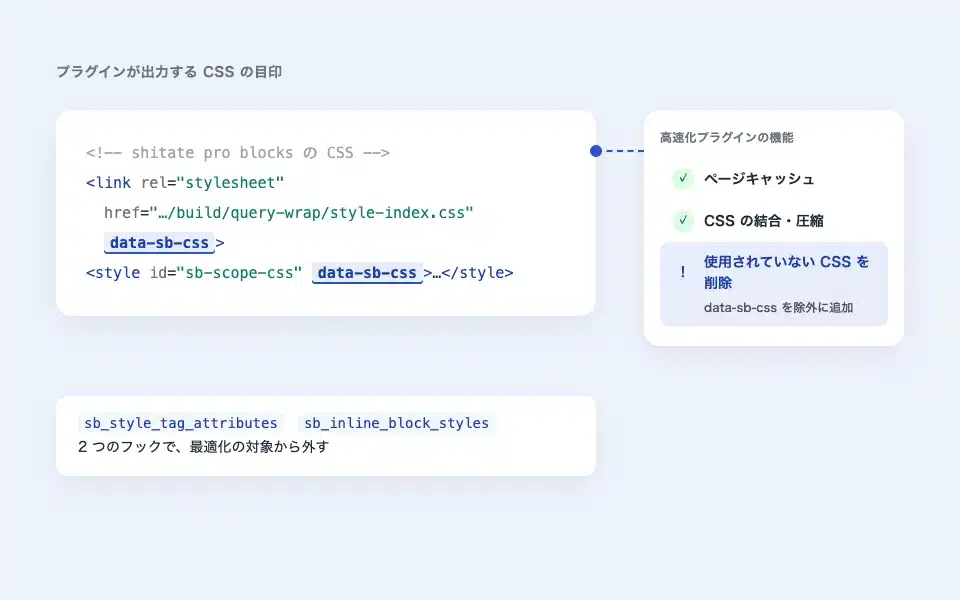
The plugin exports all the style sheets that you create. <link> And, the scope block <style id="sb-scope-css"> に sb-data-css I have added this attribute. Many optimization plugins have an exclusion setting that says "Do not touch tags with this attribute", so I have added that there. sb-data-css By registering, you can exclude the CSS of the plugin from the optimization scope.
<!-- プラグインの CSS()には data-sb-css が付く -->


…
However, WordPress has small block-specific CSS. <link> Not <style> As a result, inline CSS cannot be styled with attributes, so if you want to exclude it, you need to stop inline styling it. <link> You need to leave it as it is. The second hook is for switching between them.
Hook
The plugin itself does not have processing tailored to specific acceleration plugins. Instead, it provides the following two hooks (shitate pro blocks added in 1.7.2), which can be used in combination with your exclusion settings for optimization features.
| Name | Use |
|---|---|
sb_style_tag_attributes(Filter) | The plugin outputs <link> And the scope block <style> An array of attributes to be attached to. The default is sb-data-css That's it. You can add the attributes that the optimization plugin makes into a "non-touchable landmark" here. |
sb_inline_block_styles(Filter) | false If you return it, WordPress will stop inlineizing the blocked CSS.<link> Continue to output (the default is trueRequired when excluding by attribute. |
Example configuration: "Delete unused CSS" in WP Rocket
Sub-themes functions.php Or, add the following code to a code snippet-type plugin.
// 1. Do not inline block CSS  Leave it as it is (to assign attributes)
add_filter( 'sb_inline_block_styles', '__return_false' );

// From WP Rocket's 'Remove unused CSS', exclude CSS with data-sb-css
add_filter( 'rocket_rucss_skip_styles_with_attr', function ($attrs) {
	$attrs[] = 'data-sb-css';
	return $attrs;
} );
add_filter( 'rocket_rucss_external_exclusions', function ( $patterns ) {
	$patterns[] = 'data-sb-css';
	return $patterns;
} );
add_filter( 'rocket_rucss_inline_atts_exclusions', function ( $patterns ) {
	$patterns[] = 'data-sb-css';
	return $patterns;
} );
After adding it, run WP Rocket's "Clear Used CSS" and "Delete Cache" functions to check that the page displays without any cache, such as in a secret window.
Other Acceleration Plug-ins
The concept is the same for LiteSpeed Cache, UCSS, Autoptimize, and Perfmatters, too. If the plugin’s exclusion settings are specified by URL or file name, then shitate-pro-blocks If the method specified in the attribute is registered as sb-data-css Register the attribute. For optimization plugins that view other attributes, you can add attributes using hooks.
// 別の属性を見る最適化プラグイン向けに、目印の属性を追加する
add_filter( 'sb_style_tag_attributes', function ( $attributes ) {
	$attributes['data-noptimize'] = ''; // 例: 値なしの属性。'1' のように値も指定できる
	return $attributes;
} );
How to confirm
- In the source of the page,
shitate-pro-blocksThe CSS of<link>にsb-data-cssCheck to see if it still has the suffix after optimization. - With the browser verification tool
.sb-query-wrapSelect the blocks such as "height" and see if the height is 1px or if the nested style is applied correctly. - If the display is fixed by temporarily turning off the optimization function, then it is due to that function.
Points to note
- After changing the settings, be sure to delete the generated CSS and page cache from the optimization plug-in. If any old generated results remain, they will not be fixed.
- Even if the CSS changes due to a plugin update, you still need to recreate the generated CSS.
- In older browsers that have ended support,
@scopeIt doesn't work for my own browser. For the target browser, Operating environment for product pagesPlease see here.