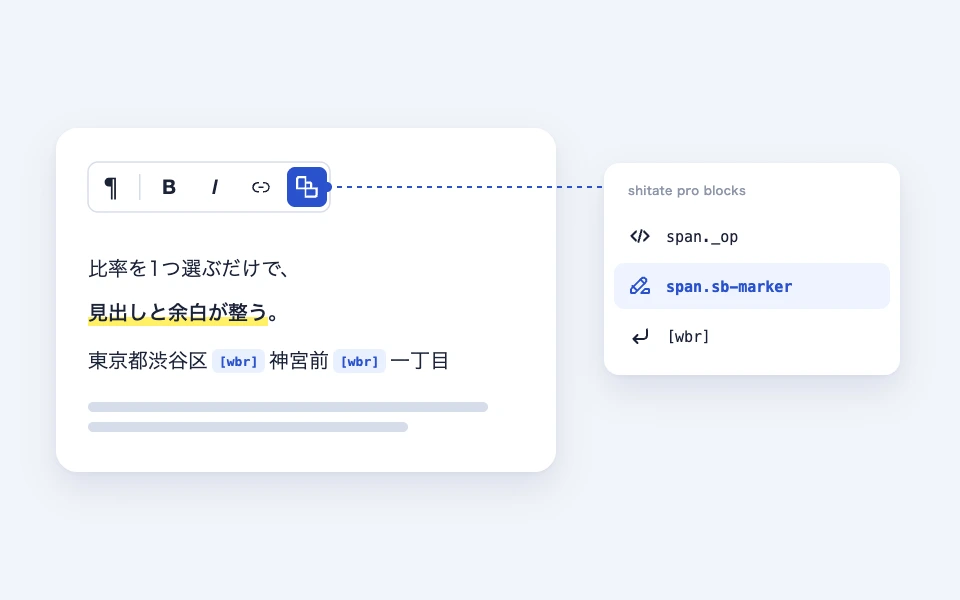
shitate pro blocks When enabled, the toolbar for text elements such as paragraphs and headings will shitate add one more button icon. To make the decorations added by this plugin easier to distinguish from those found in the standard WordPress style, all of them are grouped in a dropdown for this button.
Actual display
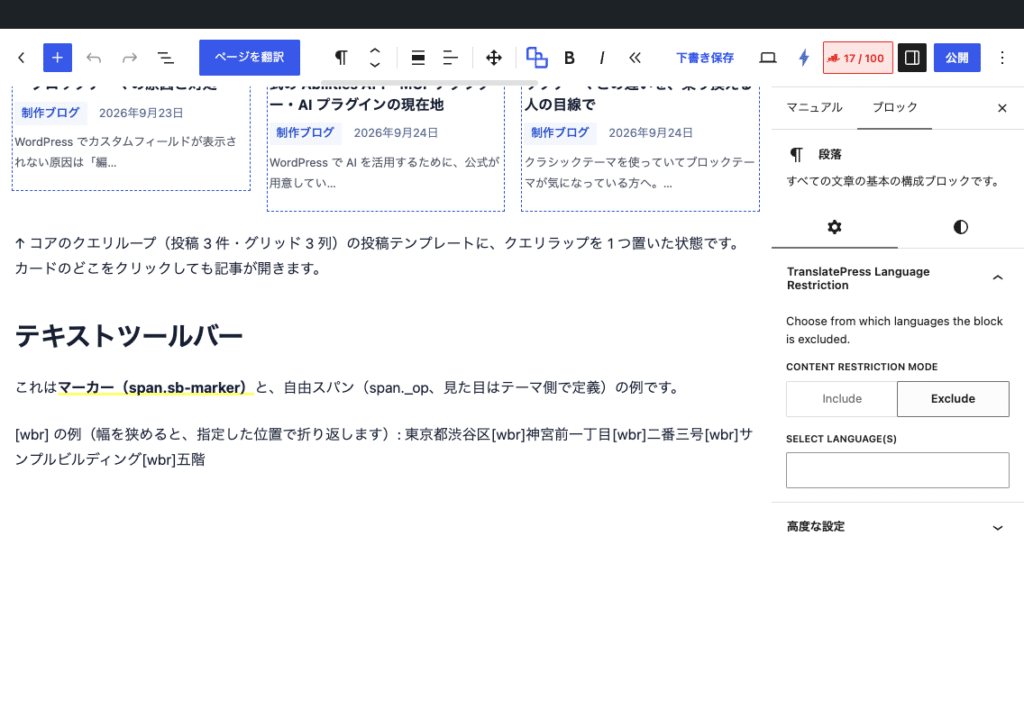
Since this manual is located on the site that is currently shitate pro blocks running, the following isReal blocks, not imagesHowever, please actually click on it, open it, and check the movement to confirm its functionality.
This isMarker (span.sb-marker)And,Free span (span._op, defined by the theme side)Here is an example of that.
Places where it can be used
In addition to the usual text fields, such as the labels of the Paragraph, Heading, List, and Core tabs, this plugin also supports its own text fields: bullet names, details titles, dl terms (dt), dialog button wording, and table of contents titles.
Contents of the drop-down
span.sb-marker (marker)
Draw a thin band marker (like a fluorescent pen) on the selected character.<span class="sb-marker"> In brackets, CSS background: linear-gradient(transparent 85%, #ff6 85%); font-weight: bold; It applies to both the front end and the editor. If you want to change the color, you can do it in the theme side. .sb-marker Please overwrite it.
/* マーカーの色を変える例 */
.sb-marker {
	background: linear-gradient(transparent 70%, #ffd6e0 70%);
}
span._op (free span)
Select the character you want to <span class="_op"> It's just a span that's enclosed by brackets.The plugin does not define the appearance at all.When you want to decide the unified highlight within the site on the theme side, we expect editors to use only this button and have the CSS managed by the theme.
/* テーマ側で _op の見た目を決める例 */
._op {
	color: var(--st-color-brand);
	font-weight: 700;
}
(Position where a newline can be inserted)
Specifies the position of the text where you can insert a newline. At the cursor position word-break: keep-all; overflow-wrap: anywhere; This prevents the address or proper names from being returned in an unintended location.
2-3-2 Kaminoyama, Shibuya Ward, Tokyo The conversion is in a two-step process: shortcodes and block replacement during block drawing. This means that not only the text but also blocks placed in the site editor’s templates (not through the the_content function) are converted.
Customize with filters
Add, change, or remove spans
sb_span_formats With the filter, you can change the list of spans to be displayed in the dropdown. Each item is represented by a class(Class name to be attached),title(Button display name),icon(Icon names for Dashicons),css(The CSS that is sent to the front end and the editor. If empty, nothing is sent).
add_filter( 'sb_span_formats', function ( $formats ) {
	// 追加: 注記用の赤太字スパン
	$formats['note'] = array(
		'class' => '_note',
		'title' => 'span._note',
		'icon'  => 'editor-textcolor',
		'css'   => 'color:#c80000;font-weight:bold;',
	);
	// 削除: マーカーを使わせない
	unset( $formats['marker'] );
	return $formats;
} );
Disable or restrict the scope of the search
Disable buttons and shortcodes altogether
add_filter( 'sb_wbr_enabled', '__return_false' );

Disable the CSS for // keep-all only ( keep the conversion to <table>)
add_filter( 'sb_wbr_css_enabled', '__return_false' );

// Filter out elements that contain CSS (default values: h1-h6, p, li, dt, dd, td, th, figcaption, blockquote, summary)
add_filter( 'sb_wbr_css_selector', fn() => 'h1, h2, h3, p' );
About loading CSS
The span and wbr CSS are always loaded in the editor, but in the front end they are not loaded.On that page, add markers, spans,
Points to note
- The marker class name is 1.7.0
_markerFromsb-markerIt has changed to 1.6 or earlier with its own CSS.._markerIf you specified.sb-markerPlease replace it with "to." - Previously existed terminal-specific newline shortcode
[br_sp][br_tab][br_pc]It has been deprecated in 1.3.0. It remains in the text so that it is displayed as a string,
Settings screen in the editor